
The Comprehensive Guide to the Insomnia Program: The Lightweight Alternative to Postman
Welcome to this comprehensive guide. If you are a web or app developer, you know the importance of testing APIs. While Postman is the most famous, there is a powerful and lightweight alternative preferred by many developers: Insomnia. In this detailed tutorial, we will take you on a journey to learn about the Insomnia program and how to use it professionally.
1. What is the Insomnia Program and why do you need it?
Insomnia is a free, open-source program for testing APIs. It is designed to be fast, lightweight, and easy to use. While Postman focuses on providing every possible feature (which sometimes makes it heavy), Insomnia focuses on providing a clean and smooth experience for the developer who wants to get the job done quickly.
2. Why choose the Insomnia Program over Postman? (Quick Comparison)
- Lightness and Speed: Insomnia consumes fewer resources from your device (RAM and CPU) and opens faster.
- Simple User Interface: Its interface is very clean and doesn't distract you with unnecessary buttons and features.
- Excellent GraphQL Support: If you work with GraphQL, Insomnia offers a better and smoother experience.
- Completely Free: The free version of the Insomnia program provides everything an individual developer needs.
3. How to Start Using the Insomnia Program? (Step-by-Step)
To start, go to the official website (insomnia.rest) and download the version for your OS (Windows, macOS, Linux).
- After installation, open the program. You will find a simple interface.
- Click the (+) sign or "New Request" to create a new request.
- Choose the request type (e.g., GET).
- Put the API URL you want to test.
- Click the "Send" button (or use Ctrl+Enter).
- The response will appear at the bottom immediately.
4. Understanding the Insomnia Program Interface in Detail (With Images)
To understand the Insomnia program, look at the following image showing the interface while sending a request:
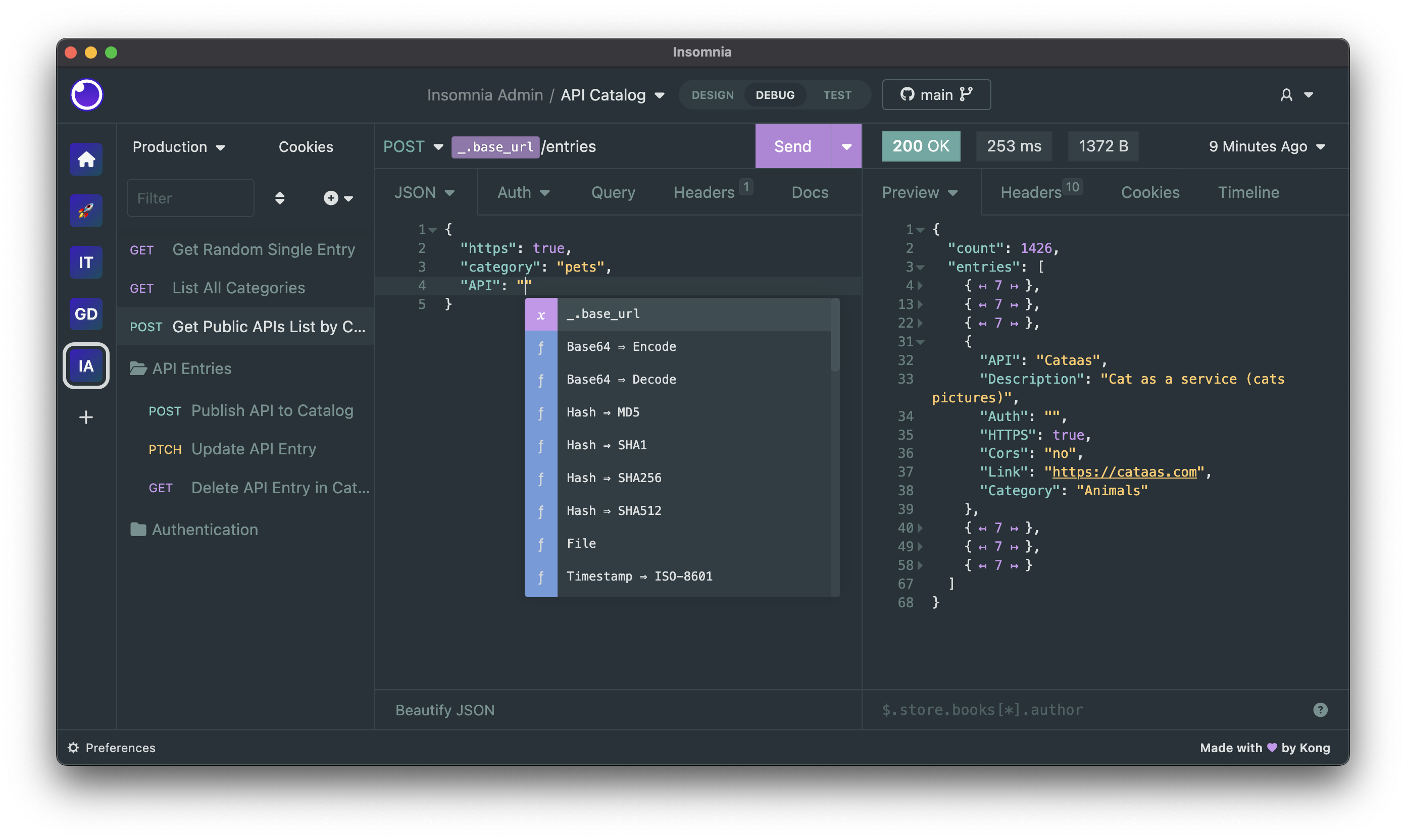
Insomnia interface while sending a POST request and receiving a JSON response.
The interface is divided into several parts, let's explain them in detail:
- Sidebar: Here you organize your requests in Workspaces. You can create a folder for each project.
- URL Bar: Here you write the URL and choose the request type from the dropdown (GET, POST, PUT, DELETE).
- Tabs: Like (Auth) for authentication, (Headers) for custom headers, and (JSON) for sending data in POST requests.
- Send Button: The purple button that starts the process.
- Response Area: At the bottom, the result appears (JSON data, status code like 200 OK, or an error like 404 Not Found).
5. Common HTTP Methods and When to Use Them?
- GET: To fetch data (like opening a web page or reading an article).
- POST: To send new data (like registering a new user or adding a comment).
- PUT: To update existing data (like editing a comment).
- DELETE: To delete data (like deleting a comment).
6. GraphQL Feature in the Insomnia Program
If you are an advanced developer, you will hear about GraphQL. It is a modern query language that allows you to request only the data you need. The Insomnia program provides excellent support for GraphQL, where you can write queries and see results directly, making it the preferred choice for many GraphQL developers.
7. FAQ
Is the Insomnia program free?
Yes, Insomnia offers a powerful free version for individual developers. Paid versions are for enterprises and large teams needing advanced collaboration features.
Can I import my requests from Postman?
Yes, the Insomnia program easily supports importing Postman collections, making it easy to switch between the two programs.
Have you tried the Insomnia program before? Share your experience in the comments!
← Back to Web Development